
Features
- Multithreaded: Assets can be loaded on an external thread, or loading synchronously on the main thread.
- Group Asset Loads: You can group multiple async load operations into a single load request.
- Custom Response Callbacks: When submitting an asynchronous load request, you can attach custom callbacks to respond to when the load request is finished. In the case of a load request containing multiple load operations, you can set a callback that is invoked for each completed asset.
- Managing Assets created in code: If you generate an Asset object in code (like generating a default white texture), you can give that Asset to the AssetManager so that it can manage its lifetime like any other Asset. See “Adding Memory Assets” below.
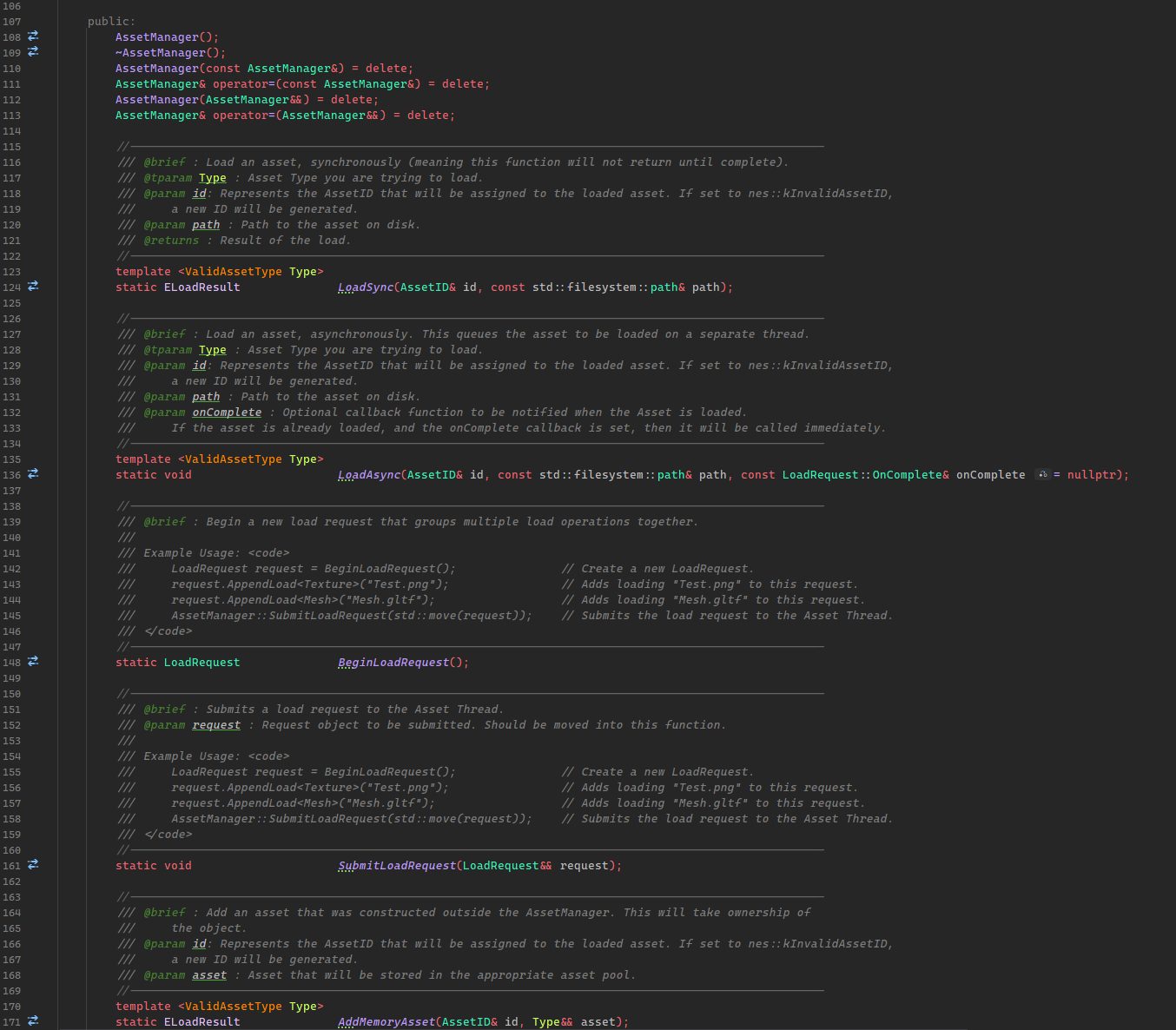
The AssetManager’s static API is used to load, free, or get a reference to an Asset. Examples of each are given below.
Loading Assets
To load an Asset, synchronously or asynchronously, you will need to know the Asset’s type, AssetID, and filepath. An AssetID is a unique identifier for a given asset, and is used when loading, getting, or freeing the Asset. You can generate this ID at runtime by passing in nes::kInvalidAssetID to any of the Load functions.The ID parameter is passed by reference, so it will be set to the generated value. The new ID will be a hash of its filepath, or a randomly generated value in the case of memory-only assets.
Loading Synchronously
To load an Asset immediately on the main thread, use AssetManager::LoadSync(). This returns an ELoadResult enum value which can used to handle errors.
// Loading a Texture synchronously:
// - By passing in an invalid AssetID, a new ID will be generated using its path.
nes::AssetID textureID = nes::kInvalidAssetID;
const nes::ELoadResult result = nes::AssetManager::LoadSync<nes::Texture>(textureID, "Texture1.png");

// Example error handling:
if (result != nes::ELoadResult::Success)
{
    NES_ERROR("Failed to load texture! \nID: {} \nError: {}", textureID.GetValue(), nes::GetLoadResultString(result));
    return;
}
Loading Asynchronously
To queue a single Asset to be loaded on the Asset Thread, use AssetManager::LoadAsync(). Unlike the synchronous load, this does not return a load result; you can provide a callback that will be invoked when the Asset is loaded. If the Asset has already been loaded, the callback will be called immediately.
// Loading a Texture asynchronously:

// Optional OnAssetLoaded callback:
// - The AsyncLoadResult is a class containing information about the load result.
//   It contains the AssetID, TypeID, and Result enum value that can be used to check
//   for errors. It also contains a progress value for the entire Load Request that
//   this result is a part of, but that is more useful for requests with multiple
//   load operations. See 'Grouping Multiple Loads Together'.
auto onComplete = [](const nes::AsyncLoadResult& result)
    {
        NES_LOG("Request Complete!\n");

        if (!result.IsValid())
        {
            NES_ERROR("Failed to load texture! \nID: {} \nError: {}", result.GetAssetID().GetValue(), nes::GetLoadResultString(result.GetResult()));
        }
    };

// By passing in an invalid AssetID, a new ID will be generated using its path.
nes::AssetID textureID = nes::kInvalidAssetID;

// There is no return value for the Async call. If the Asset has already finished loading,
// 'onComplete' will be called immediately.
nes::AssetManager::LoadAsync<nes::Texture>(textureID, "Texture1.png", onComplete);
Special Case: Calling LoadSync before LoadAsync is Complete.
In this example, a single Texture asset is requested twice, first asynchronously, then synchronously.
// Requesting 'Texture 1' be loaded asynchronously.
nes::AssetManager::LoadAsync<nes::Texture>(m_texture1, texturePath1);

// Requesting the same texture synchronously.
const ELoadResult result = nes::AssetManager::LoadSync<nes::Texture>(m_texture1, texturePath1);
When LoadAsync is called, the Asset’s internal state value is set to EAssetState::Loading. This means that the Asset has been queued to load on the Asset Thread; it is not finished yet. If the Asset is still in this state when it is requested to be loaded synchronously, the synchronous load will occur immediately, regardless of the pending state. However, the Asset Thread’s load operation is not canceled! A duplicate Asset will be loaded on the Asset Thread and then destroyed when processing the result; the AssetManager will see that we already have that Asset loaded in memory, so the duplicate will be discarded.
Grouping Multiple Loads Together
Multiple Assets can be loaded as part of a single LoadRequest. A request is created through AssetManager::BeginLoadRequest(). This request object can be used to append any number of load operations and set optional notification callbacks. Each load operation will be processed in the order they are added. To submit a load request, use AssetManager::SubmitLoadRequest().
// Example of a Load Request for two textures:

// Optional OnComplete callback. This is called when *all* load operations have finished.
// - 'success' will be true only if *all* load operations were successful.
auto onComplete = [](const bool success)
    {
        if (!success)
        {
            NES_ERROR("Failed to load textures!");
        }
    };

// Optional OnAssetLoaded callback. This is called for every single asset that is loaded.
// For LoadRequests with multiple asset loads, you can also use the result's GetRequestProgress()
// to get a value from [0, 1] where 0 = no assets loaded, and 1 = the entire request is completed.
auto onAssetLoaded = [](const nes::AsyncLoadResult& result)
    {
        if (!result.IsValid())
        {
            NES_ERROR("Failed to load asset! \nID: {} \nError: {}", result.GetAssetID().GetValue(), nes::GetLoadResultString(result.GetResult()));
        }

        NES_LOG("Request Progress: {0:2f}", result.GetRequestProgress());
    };

// Begin a new request:
nes::LoadRequest request = nes::AssetManager::BeginLoadRequest();

// Set optional callbacks:
request.SetOnCompleteCallback(onComplete);
request.SetOnAssetLoadedCallback(onAssetLoaded);

// IDs for each texture asset we want to load.
nes::AssetID texture1 = nes::kInvalidID;
nes::AssetID texture2 = nes::kInvalidID;

// Append each load in the order you want them processed in.
// - The asset IDs will be generated when appending to the request.
request.AppendLoad<nes::Texture>(texture1, "Texture1.png");
request.AppendLoad<nes::Texture>(texture2, "Texture2.png");

// Submit the load request object to the Asset Manager.
nes::AssetManager::SubmitLoadRequest(std::move(request));
Using AssetManager::LoadAsync actually generates this same request object; it just contains a single load.
Adding Memory-Only Assets
If you need to create an Asset at runtime, but want to have it managed by the asset system, you can use AssetManager::AddMemoryAsset().
// Texture object created somewhere in code:
nes::Texture m_texture;

// Memory-only assets can have their IDs be generated as well - the ID will be generated
// using an internal generator rather than a filepath.
nes::AssetID createdTextureID = nes::kInvalidID;

// Give ownership of the texture asset to the Asset Manager.
nes::AssetManager::AddAMemoryAsset<nes::Texture>(createdTextureID, std::move(m_texture));
Using Assets
Assets are currently only accessible on the main thread.
To get access to an asset, call AssetManager::GetAsset<Type>(). This will return an AssetPtr<Type> object, which is functionally similar to a std::weak_ptr. When an AssetPtr is created, it will add a ‘lock’ to the given Asset. When the pointer object leaves scope, it will remove a ‘lock’ to that Asset. While the lock count is greater than 0, the Asset cannot be freed.
// Get an asset.
// - The pointer can be null if the ID is invalid or the Asset is not loaded!
AssetPtr<nes::Texture> pTexture = AssetManager::GetAsset<nes::Texture>(m_textureID);

// Asset Pointers are boolean convertible, same as a pointer.
// - You can also check 'pTexture != nullptr'
if (pTexture)
{
    // The asset is valid, use it!
    FunctionThatNeedsATexture(pTexture);
}
Freeing Assets
Assets must be explicitly freed with a call to AssetManager::FreeAsset(). Freed assets must be loaded again to be used.
An Asset will not be destroyed immediately when calling FreeAsset(). It will queued, and only destroyed when there are no more external locks (see Using Assets above). If an Asset that has been added to the free buffer is requested again (by calling GetAsset(), or one of the load operations), the Asset will be removed from the free buffer and will have to be explicitly freed again.
// The Asset will be freed on a future frame when there are no more locks.
AssetManager::FreeAsset(m_textureID);
Creating an New Asset Type
All Assets must inherit from AssetBase. The base class manages the type info, locking interface, and a virtual function for loading from a filepath. All derived classes must be default constructible. When loading a new asset, the Asset object is dynamically allocated, then its LoadFromFile function is called which returns
an ELoadResult.
// Basic example of an Asset implementation.
class ExampleAsset final : public AssetBase
{
    // This macro is required - it will define the Typename and TypeID for the class.
    // - It should be in the private scope.
    NES_DEFINE_TYPE_INFO(ExampleAsset)

public:
    // Asset destructors are expected to cleanup the Asset memory.
    virtual ~ExampleAsset() override;

private:
    // Override this function for the loading logic.
    virtual ELoadResult LoadFromFile(const std::filesystem::path& path) override;
};

// `IsValidAsset` is a concept that can be used to ensure that the class was setup correctly.
// This concept is used for all templated functions in the AssetManager's API.
static_assert(IsValidAsset<ExampleAsset>);
Loading other Assets within an Asset’s Load Function
Say you are loading a Mesh and need to load a Texture for its diffuse map. How are you supposed to load that Texture?
AssetManager::LoadSync() is setup for just this case! It checks if you are on the main thread or not, and will perform the necessary bookkeeping and load the asset immediately. AssetManager::LoadAsync() and AssetManager::Begin/SubmitLoadRequest() cannot not be used. Those functions access main thread data to queue work on the Asset Thread.
IMPORTANT: The Asset will be loaded as normal, but it cannot be used in the body of the load operation, regardless if it was successful. Assets are only accessible on the Main thread, and if they were previously loaded, the Load operation will not need to run again, but the Asset does not exist on the Asset Thread.
// Example case where a Mesh needs to load a Texture map.
ELoadResult Mesh::LoadFromFile(const std::filesystem::path& path)
{
    Assimp::Importer importer;
    int importFlags = aiProcess_Triangulate | aiProcess_MakeLeftHanded | aiProcess_FlipUVs;

    const aiScene* pScene = importer.ReadFile(path.string().c_str(), importFlags);
    if (!pScene)
    {
        NES_ERROR("LoadMesh(): Failed to load assimp file! Error: ", importer.GetErrorString());
        return ELoadResult::InvalidArgument;
    }

    // ... Load Vertex/Index Data ...

    // Check for Materials:
    if (pScene->HasMaterials())
    {
        const aiMaterial* pMaterial = pScene->mMaterials[0];

        // Load the Base Color Texture:
        aiString texturePath;
        if (pMaterial->GetTexture(AI_MATKEY_BASE_COLOR_TEXTURE, &texturePath) == AI_SUCCESS)
        {
            // ... Handle Embedded Texture case ...

            // Load the Texture from the path:
            std::filesystem::path filepath = path.parent_path();
            filepath /= texturePath.C_Str();

            // This will store the Texture Asset ID.
            m_baseColorTextureID = nes::kInvalidAssetID;

            // Load the Texture Asset:
            // - Remember the Texture Asset cannot be used in the body of this function!
            const ELoadResult textureResult = AssetManager::LoadSync<nes::Texture>(m_baseColorTextureID, filepath);
            if (textureResult != ELoadResult::Success)
            {
                NES_ERROR("LoadMesh(): Failed to load base color texture! Error: ", nes::GetLoadResultString(textureResult));
                // ... Cleanup logic ...
                return ELoadResult::Failure;
            }
        }

        // Other Textures...
    }

    // Other Logic...

    return ELoadResult::Success;
}
The Asset Thread, in Detail.
Currently, there is a single external thread that loads the Assets. The Asset Thread itself is a nes::WorkerThread, which I won’t go into detail now, but what is important to know that this allows the thread to sit in an idle state and only woken up when sent a specific instruction. For the Asset Thread, there is only a single instruction, which is sent when LoadAsync() or SubmitLoadRequest() is called.
The Data
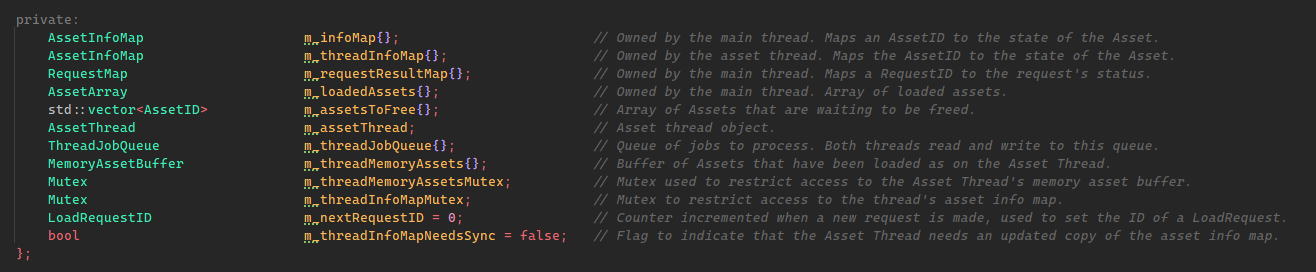
Before I get too far, I want to talk about the data. This all of the AssetManager’s data, in code. I know it
is a bit small - I will explain more in detail below.
AssetInfo Maps
Both the main thread and the Asset thread both maintain individual ‘info’ maps. They map an AssetID to meta data about the Asset.

The AssetInfo struct contains the Asset’s index into the loaded assets array (if valid), its current state, its type ID, and the result of the load.
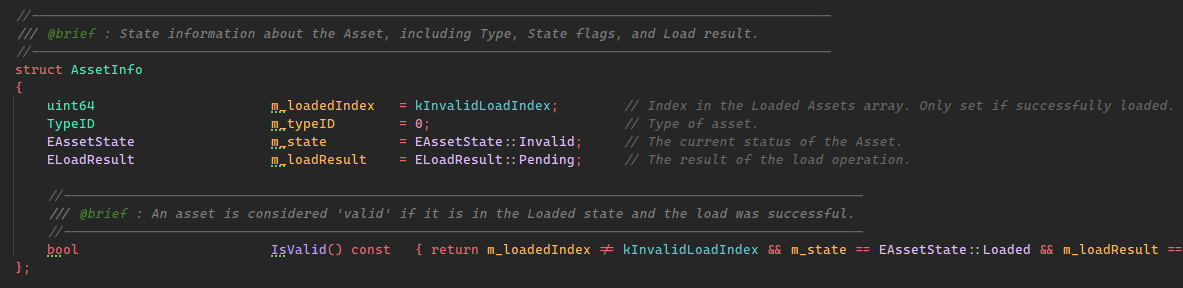
These maps are used to query if an Asset is already being loaded, if it is valid, etc. The Asset Thread’s map is only synced when the Asset Thread is idle and if the thread’s map is out of date. More on syncing later.
Loaded Assets Buffer
Assets are heap allocated, and the pointers are stored in an array that is owned by the main thread.

Why not store the memory pointer in the AssetInfo struct? In the current design, Assets are only accessible on the Main Thread, to prevent locking on each attempted access. I didn’t want the Asset pointer to be accessed from the Asset Thread’s info map at all. It stores a copy of an index, rather having direct access.
Load Request Status Map
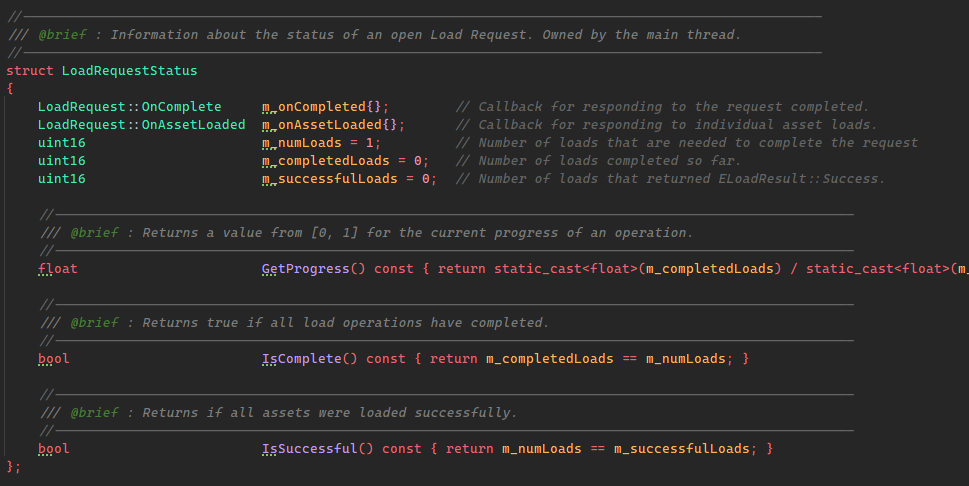
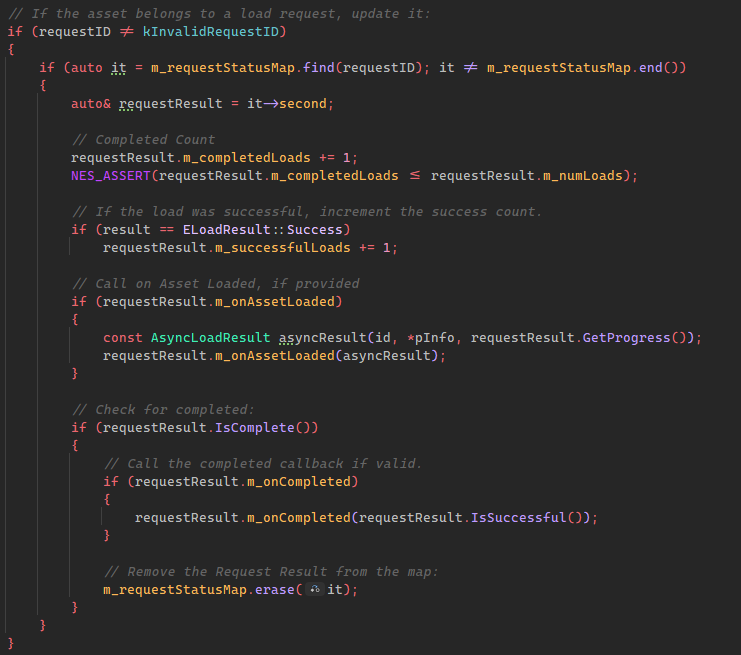
When a load request is created, it is given a unique id. When the request is submitted, this id is mapped to a LoadRequestStatus object and stored in the RequestMap.

The status struct stores the notification callbacks if provided, and tracks the number of completed and successful loads. Once request is complete, the entry is
destroyed.
The Job Queue
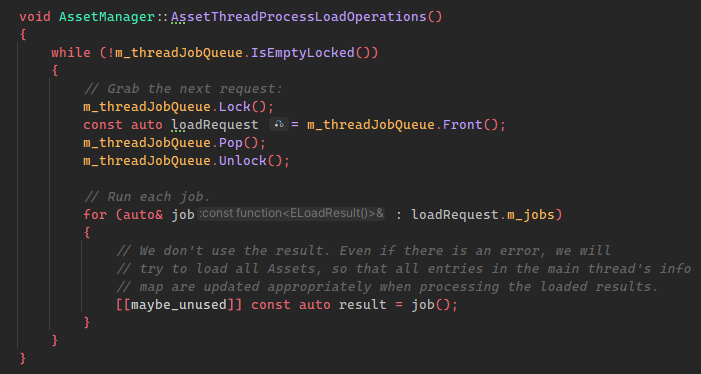
Once the LoadRequestStatus is created, the LoadRequest itself is enqueued into a thread safe queue for the Asset Thread to process.

The ThreadSafeQueue<Type> is just a wrapper around a std::queue and a std::mutex with an “locking” and “non-locking” interface.
In the Asset Thread’s main function, it pops the next job off the queue and runs it.
Memory Assets Buffer
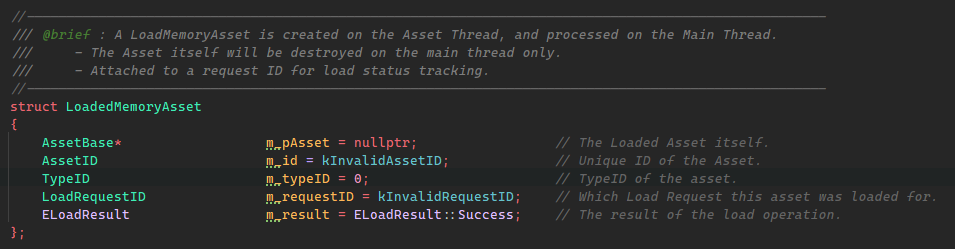
This is an array of loaded memory assets and is protected by a mutex. The Asset Thread fills this array, and the Main Thread clears it when processing the Assets.

A LoadedMemoryAsset contains the asset itself, meta data about the asset, and the request ID that the asset belongs to.
Frame Sync
Every frame, AssetManager::SyncFrame() is called to do the following:
- Process the Assets that have been queued to free.
- Process Loaded Memory Assets that have been completed by the Asset Thread.
- Sync the Asset Info between the two threads, if possible.
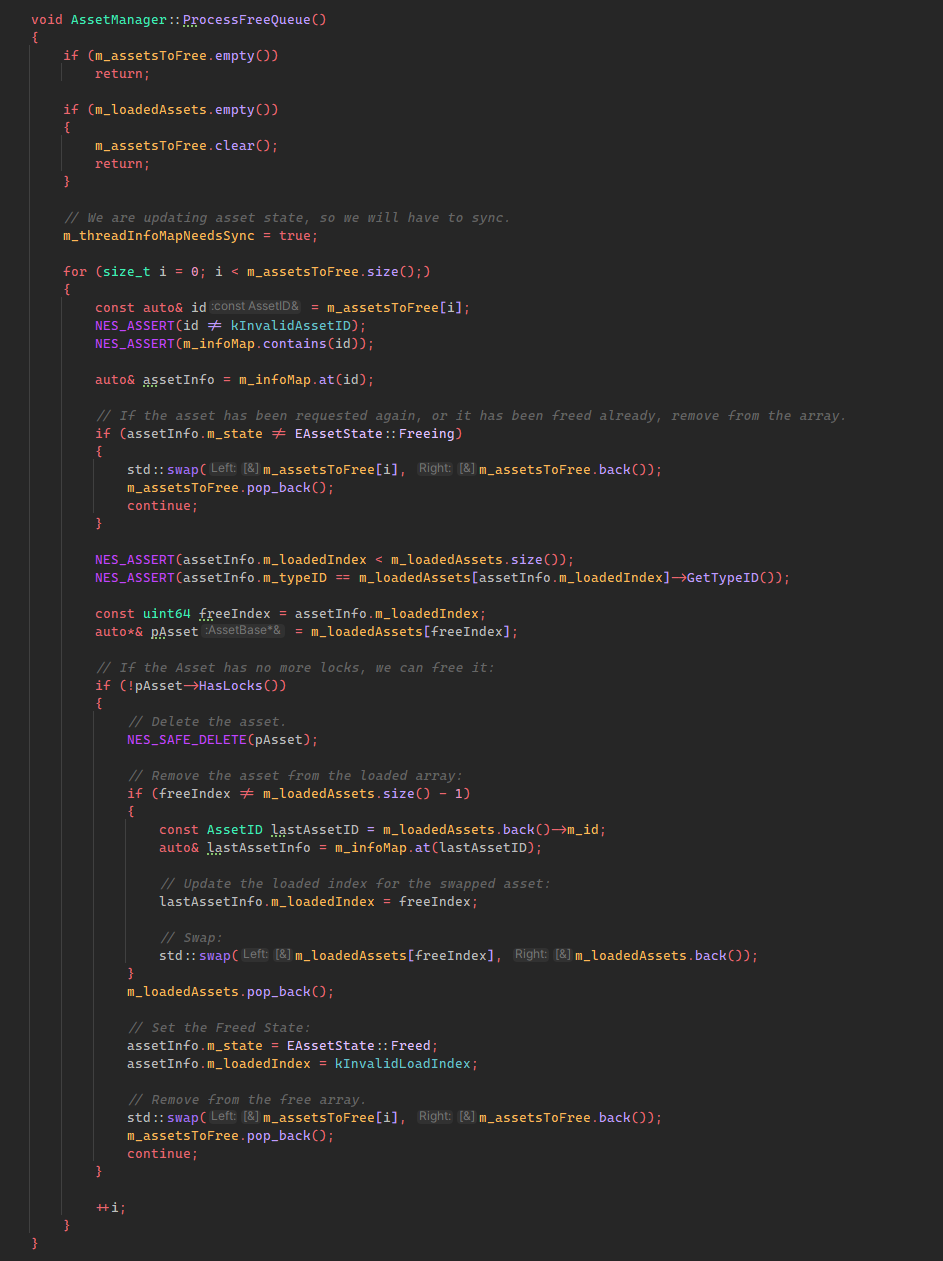
Processing the Free Queue
As stated in the Freeing Assets section, Assets are not immediately freed when calling AssetManager::FreeAsset(). The AssetID will be added to the array of all
Assets that have been requested to be freed, to be processed at the beginning of the AssetManager::SyncFrame(). The function is fairly straightforward: we loop through all indices and if they are still marked to free and the asset has no more locks, free it.
Processing Loaded Assets from the Asset Thread
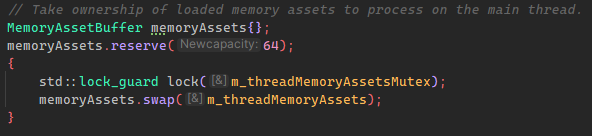
Loaded assets from the Asset Thread are placed into the m_threadMemoryAssets array, which is protected by a mutex. During the AssetManager::SyncFrame(), we first take a local copy of that array to process them.
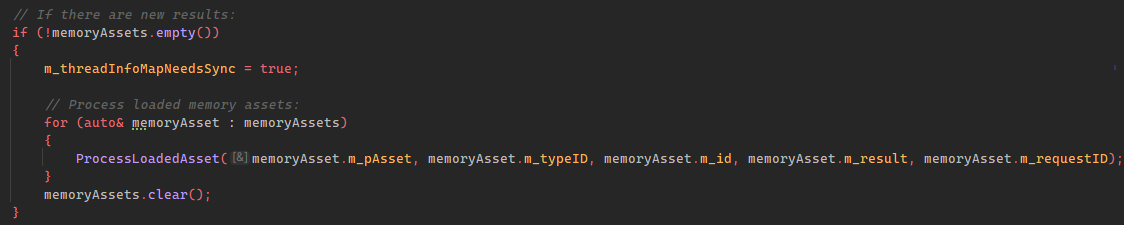
Then we loop through each of these assets and process their result.
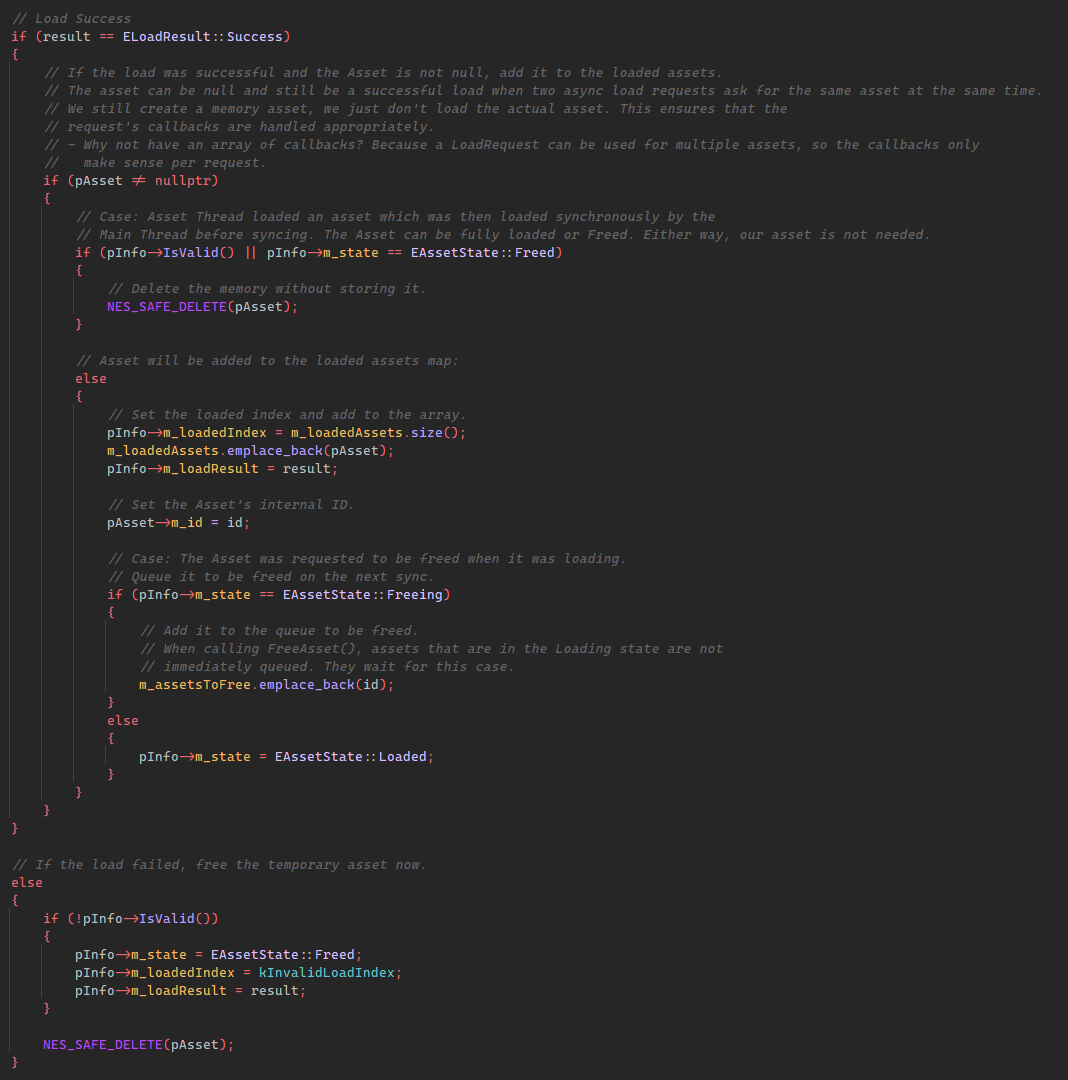
Here is the logic for handling memory assets. I will let the comments speak for themselves.
Finally, we dispatch any callbacks set for the attached request.
Syncing Asset Info
The main thread and the Asset Thread maintain separate AssetInfo maps, but are only synced when certain criteria is met:
- The Asset Thread is idle. This keeps the Asset Thread’s view of loaded Assets immutable while active. This is important to protect against changes in state while an Asset is being loaded.
- The Asset Thread’s map is out of date. The Asset Thread’s map is out of date any time a the main thread’s
AssetInfoMapis updated. This happens on any load call (synchronous or asynchronous) or freeing. A special flag is set when any of these operations occur.
After processing all loaded assets, we check for these two criteria and update the thread’s info map if necessary.

Another approach could be creating a more strict sync event by waiting until the Asset Thread to become idle to process the loaded assets, update the map and enqueue more work. I went with this approach because I it allows me to process assets as soon as they are ready, in smaller chunks, while keeping the Asset Thread’s “source of truth” immutable while it is running. It can lead to some special cases, like overriding a LoadAsync call with a call to LoadSync, but I feel that is more of a user error that should be avoided.
There is more that I could go over, namely the internals of the load functions themselves, but this should give enough of an idea about the overall structure of the system. There are aspects that I want to explore in the future, like using a thread pool to load multiple assets simultaneously, or thread local asset storage, but this will be more than enough for now. I will be continuing work on the Renderer.